Þingvellir Rift 3D Terrain Model
Workflow documentation: GIS, cartography, 3D printing and interactive web map
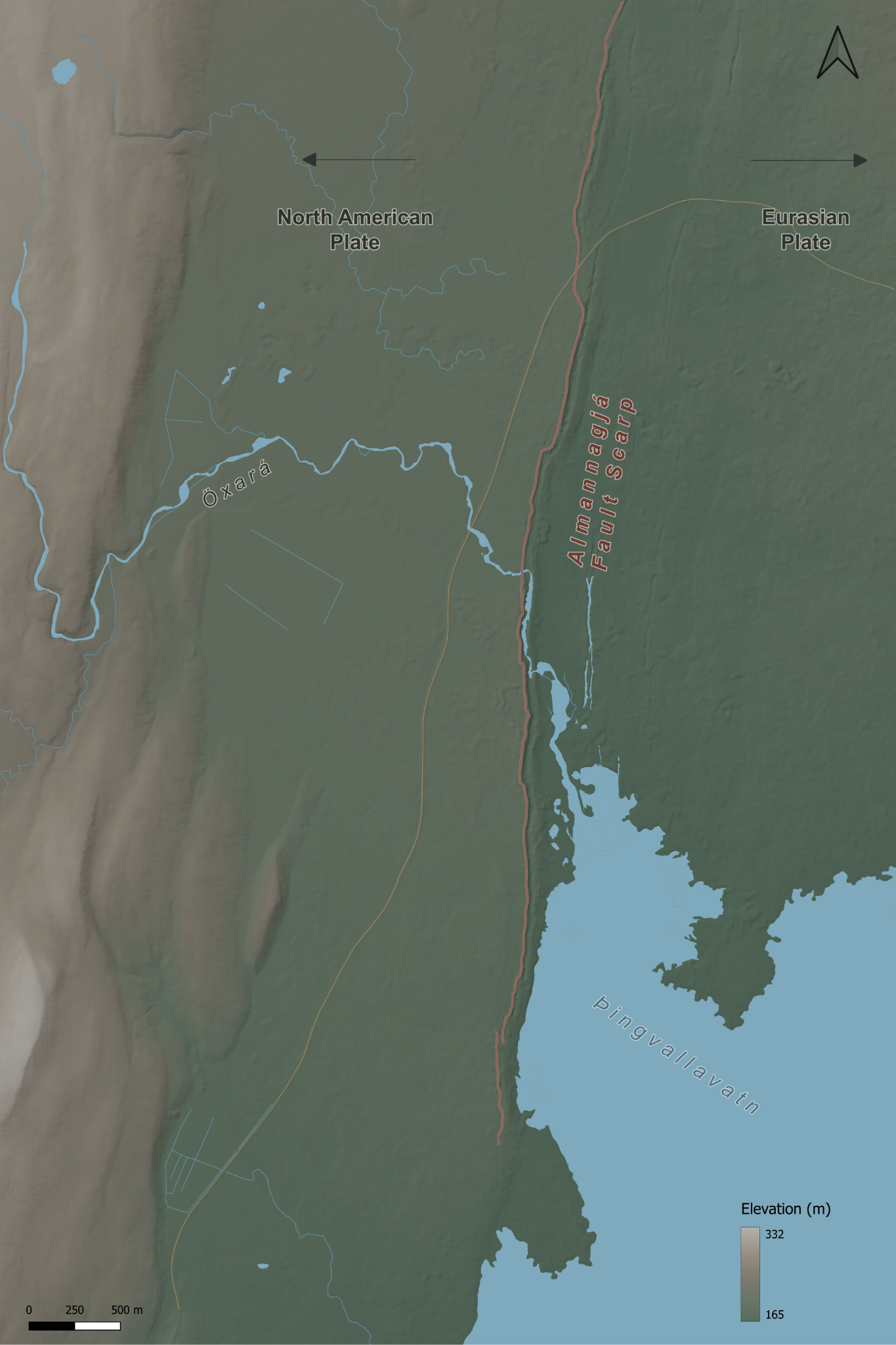
Final cartographic drape for the Þingvellir terrain model.
Year 5 earthquakes and volcanoes teaching resource • documented 6 October 2026
1. Project overview
Concept. The project was designed as an earthquake counterpart to the Etna volcano model. Rather than printing a generic fault diagram, the aim was to use a real plate-boundary landscape that pupils could inspect physically and in 3D. Þingvellir was selected because it lies within the active rift zone between the North American and Eurasian plates, and because the fault scarps are visible in the terrain.
Teaching principle. The model should make the fault structure legible without exaggerating the landscape so much that the result becomes misleading. The final workflow therefore involved repeated testing of crop, scale and vertical exaggeration before any detailed cartographic styling was completed.
Final working specification
| Parameter | Final value | Reason |
|---|---|---|
| Project CRS | EPSG:3413 – WGS 84 / NSIDC Sea Ice Polar Stereographic North | Native ArcticDEM projected CRS; metres; avoids unnecessary DEM reprojection during modelling. |
| Final terrain extent | Shared final QGIS extent | The physical print, map layout and interactive model use the same geographical crop. |
| Scene centre | X 1,146,800; Y -2,591,600 | Centre used for the final Qgis2threejs scene and map crop. |
| Extent | Same final extent for all three outputs | Use the final source QGIS project for exact clipping coordinates; earlier figures were inconsistent. |
| Elevation range | Approximately 165–332 m | Used for the final elevation colour ramp. |
| Horizontal print scale | Final layout: 333.33 × 500 mm | The exact ground scale should be taken from the final QGIS layout rather than inferred from earlier crop notes. |
| Vertical exaggeration | 1.75× | Compromise between a readable fault scarp and excessive western upland relief. |
| Overall physical size | 333.33 × 500 mm | Exact Final layout: 333.33 × 500 mm representation of the final 5 × 7.5 km extent. |
| Print division | 2 rows × 2 columns | Four manageable terrain tiles and four matching A4 drape sheets. |
| Tile size | 166.67 × 250 mm | Fits comfortably on the Bambu A1 bed and on A4 paper. |
| Base thickness | 2 mm | Rigid enough for handling without excessive material. |
2. Site selection and DEM acquisition
Initial candidates. San Andreas, Kaikōura and Þingvellir were considered. Þingvellir was chosen because the rift morphology is visually legible, it directly links plate divergence with faulting, and the terrain can support both a physical model and a web-based 3D exploration.
DEM source. ArcticDEM was used. A lower-resolution view was useful for orientation, while the high-resolution ArcticDEM mosaic provided the terrain detail required for the final model. The native CRS is EPSG:3413.
Source: Polar Geospatial Center – ArcticDEM Source link
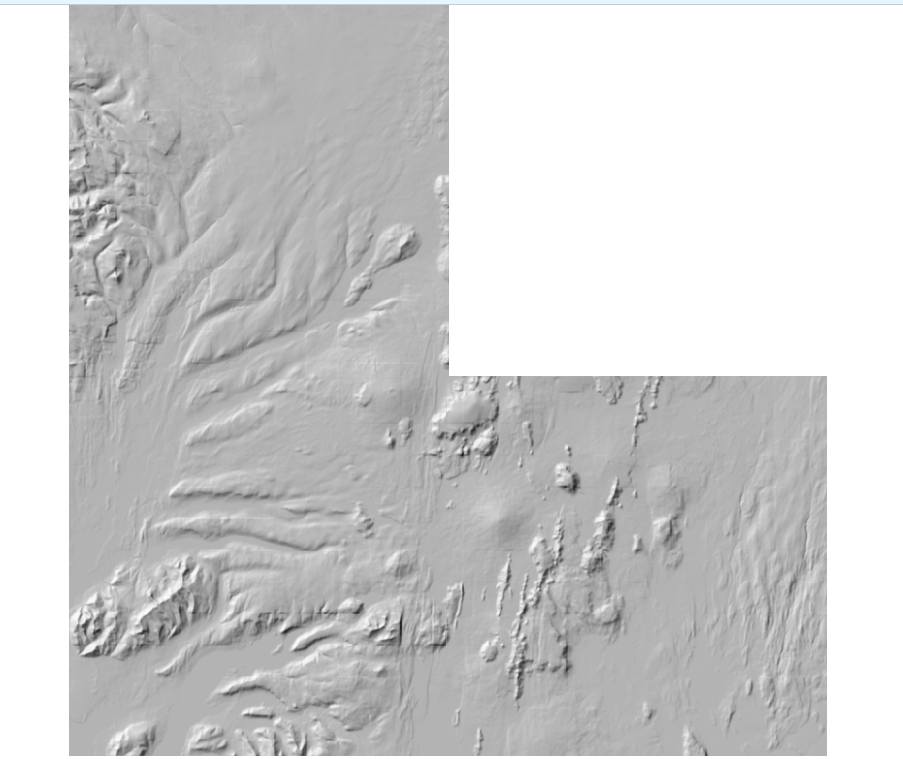
Early DEM/hillshade inspection before the site was geographically anchored and tightly cropped.
3. Choosing the model extent
The extent was deliberately refined in stages rather than fixed at the start. Broad scenes contained too much lake or too much western mountainous terrain, which reduced the visual importance of the rift. The final crop shifted east and narrowed the width while retaining a long north–south section of Almannagjá.
• Final crop: the same final QGIS extent was used for the physical terrain, matching print layout and interactive model, keeping the scarp and rift floor as the main subjects.
Shared model extent. The physical terrain model, print layout and interactive Qgis2threejs model use the same final geographical extent. The finished physical model and map measure 333.33 × 500 mm. The earlier crop figures in these notes were not a reliable record of the final export and have been removed.
4. 3D terrain modelling and vertical exaggeration
Qgis2threejs was used for rapid visual testing. DEMto3D was used to generate the printable terrain geometry. The decisive design problem was vertical exaggeration: too little made the scarp hard to read physically; too much turned the western upland into the dominant visual feature.
| Test | Result | Decision |
|---|---|---|
| 4× | Fault highly legible, but surrounding upland became exaggerated and visually dominant. | Rejected. |
| 3× | Still too dramatic in the physical slicer view. | Rejected. |
| 2× | Geologically more convincing; rift remained visible, but upland was still fairly strong. | Useful reference. |
| 1.5× | Upland looked proportionate, but the rift became too subtle in the slicer. | Rejected as too weak. |
| 1.75× | Retained a clear scarp while keeping the western mountains under control. | Selected for the first print. |
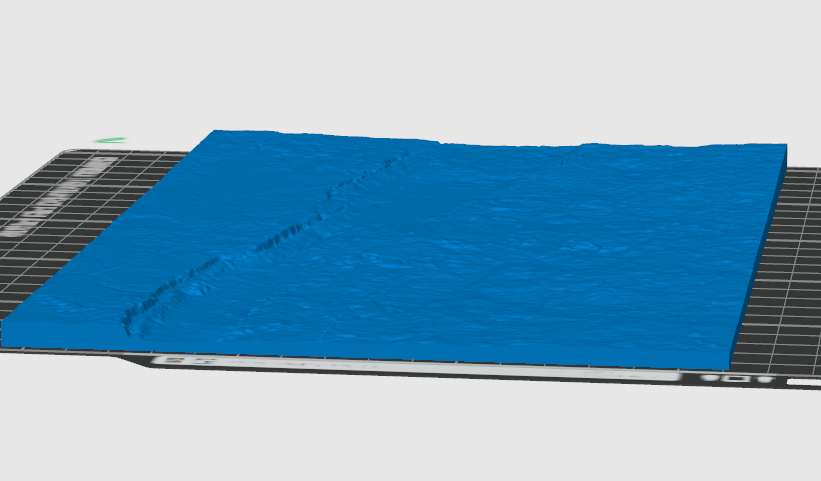
Slicer inspection at 1.5× exaggeration: the mountains were controlled, but the fault scarp became too subdued. This prompted the move to 1.75×.
DEMto3D print settings. Overall model 333.33 × 500 mm; 2 × 2 split; each tile approximately 166.67 × 250 mm; base height 2 mm; sides enabled; border 0 mm; terrain inversion off. A 0.2 mm DEM/model spacing setting was recorded.
5. Cartographic styling
The map was styled to look recognisably Icelandic without using a generic green–brown–white relief ramp. The palette was deliberately muted so that the fault, water and tectonic annotations remained clear.
Elevation ramp
| Elevation | Colour |
|---|---|
| 165 m | #546B5C |
| 200 m | #667565 |
| 240 m | #7C786C |
| 285 m | #958D80 |
| 332 m | #B3AFA7 |
Hillshade. A subdued hillshade was retained over the elevation ramp to make scarps and subtle relief readable without making the map muddy.
Hydrography
Source. The official Icelandic IS 50V “Vatnafar” GeoPackage was used. Only geometry-bearing layers were required: vatnafar_linur for rivers/streams and vatnafar_flakar for lakes and water polygons. The numerous NoGeometry tables were lookup/metadata tables and were not mapped.
Source: Icelandic geospatial base-map data (IS 50V) Source link
Water styling. Lakes and rivers use cool, desaturated blue tones so that they remain distinct from the moss/ash terrain without becoming visually dominant.
Roads and fault
Roads. Only the useful major road context was retained. The route was manually traced because the map did not need a complete road network. Styling was deliberately subdued in ochre so that the road sat behind the geology.
Almannagjá. The main western fault scarp was manually digitised as a line following the crest/break in slope rather than the foot of the scarp or the darkest hillshade pixels. It was styled in a muted red-brown with a subtle pale casing so that the fault remained the dominant mapped line without resembling a road.
Labels and tectonic annotation
• Öxará: labelled once along the river, using the Icelandic name only rather than “River Öxará”.
• Þingvallavatn: labelled within the lake in a darker blue-grey.
• Almannagjá – Fault scarp: set alongside the scarp in the same red-brown family as the fault line; no leader line was retained because proximity made it redundant.
• Plate names: North American Plate on the west and Eurasian Plate on the east, both in charcoal with a warm pale buffer.
• Movement arrows: simple black/charcoal arrows pointing away from the rift. They were deliberately spread away from the centre to avoid the physical print seam.
• Elevation legend: titled “Elevation (m)”.
6. Print layout and A4 tiling
The full map layout matches the physical terrain footprint at 333.33 × 500 mm. It is divided into four quarters for printing on A4 paper, with 3 mm bleed and crop marks on each sheet.
Quarter size: 166.67 × 250 mm. This fits comfortably inside A4 (210 × 297 mm) and corresponds directly to the four terrain tiles.
Seam-aware design. The central vertical and horizontal joins were treated as design constraints. Important labels and arrows were shifted so that no key text was cut in half. The plate arrows were intentionally spread outward for this reason.
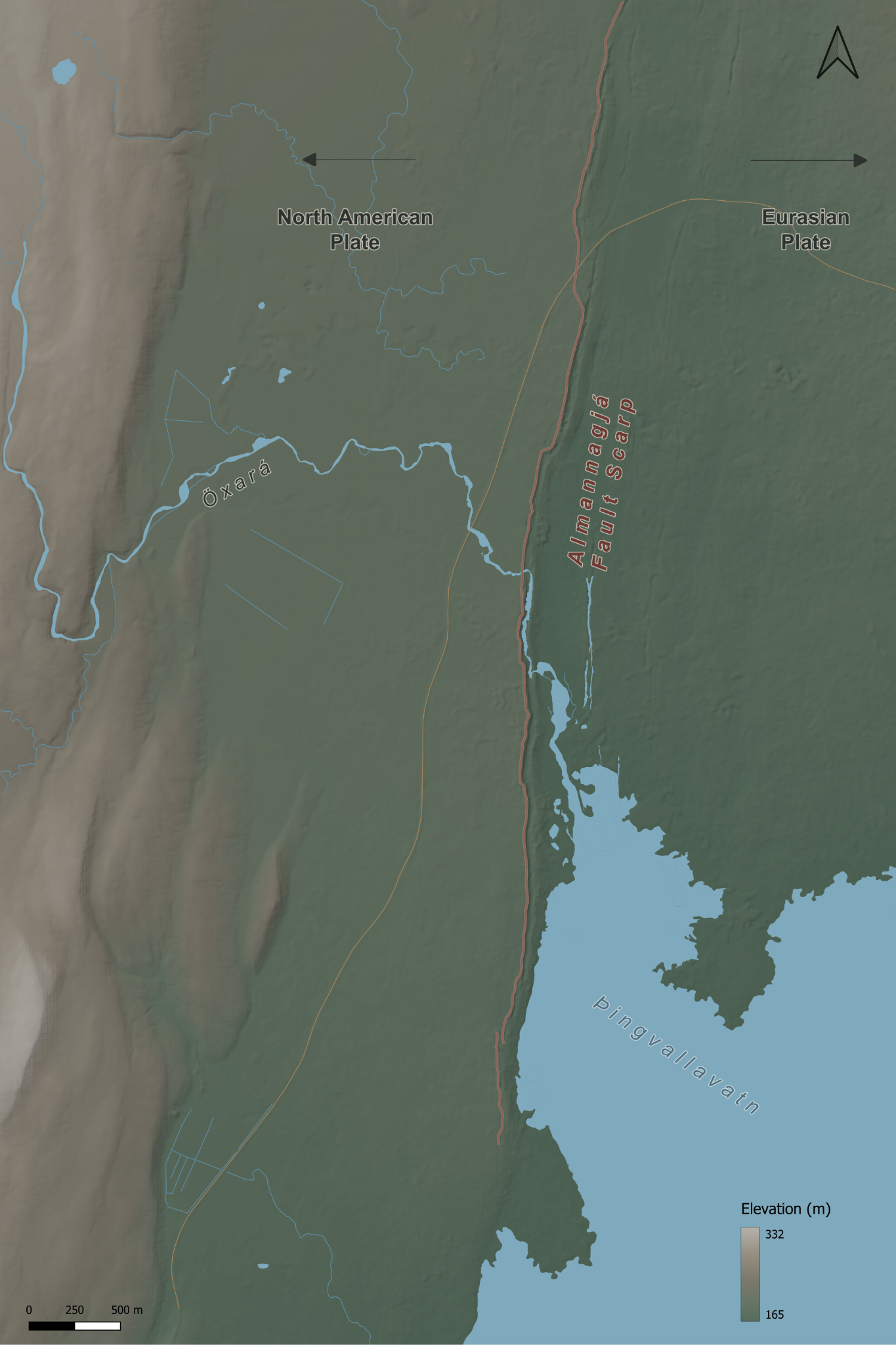
Final print-layout drape. The typography and annotation were arranged around the 2 × 2 print seams.
7. Interactive Qgis2threejs version
The finished map texture is draped over the matching terrain in Qgis2threejs. The interactive model and physical print share the same geographical extent. The web scene uses 1.75× vertical exaggeration and allows pupils to rotate and inspect the rift morphology.
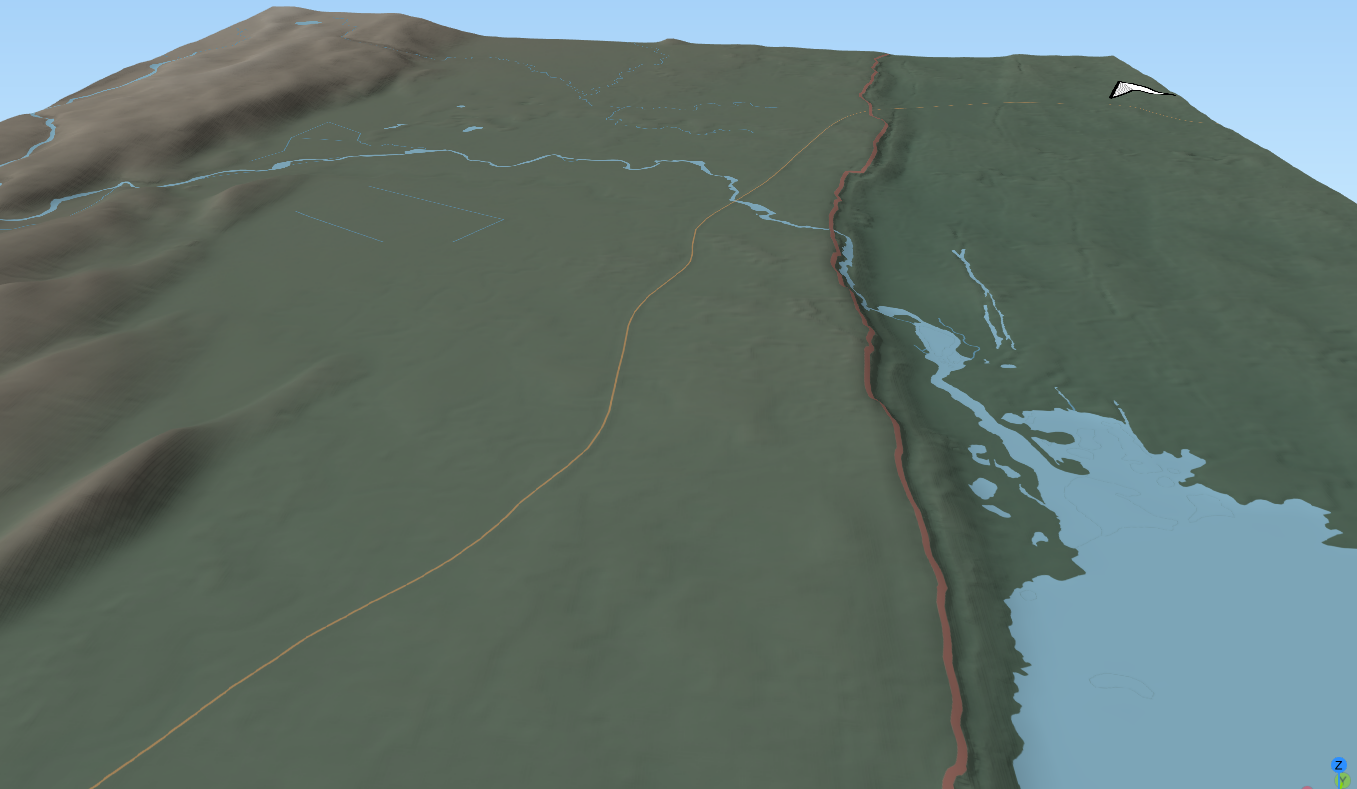
Qgis2threejs view of the styled map draped over the terrain.
Interactive points. Six clickable spheres open KS2 information cards for Almannagjá, the two plates, Öxará, Þingvallavatn and the historic assembly site. Each card includes an image, geographical explanation, vocabulary, an observation prompt and source links. The controls can be collapsed on smaller screens.
| ID | Feature | Placement logic |
|---|---|---|
| thingvellir | Þingvellir | Original planning anchor at Hakið; the web card discusses the historic assembly grounds and their rift-valley geography. Check marker position in QGIS. |
| almannagja | Almannagjá | On a clear section of the mapped fault scarp. |
| oxara | Öxará | On the river near the historic/visitor area. |
| thingvallavatn | Þingvallavatn | Inside the lake rather than on the shoreline. |
The information cards, photographs, plate maps and website styling were added after export. A Credits panel records terrain, water data, software and image attributions. Feature assignments were inferred from position because the exported scene contained no name/type/id attributes; they should be checked against the QGIS point layer before publication.
8. Design decisions and lessons learned
• Crop before styling: The choice of terrain extent changed the model more than any later cartographic adjustment. Styling before the crop was stable would have wasted time.
• Judge terrain in the slicer: A Qgis2threejs preview can make relief appear stronger than it will physically. Bambu Studio exposed when exaggeration made mountains too dominant or the scarp too subtle.
• Vertical exaggeration is a teaching decision: The final 1.75× setting is not intended to reproduce literal vertical scale; it makes the fault legible while keeping the broader terrain believable.
• Use official hydrography where possible: The IS 50V water data avoided hand-tracing a dense and complex drainage network.
• Simplify contextual layers: Only useful roads and labels were retained. Full road/path networks would have reduced geological clarity.
• Design around physical seams: The 2 × 2 A4/A1 workflow affects label placement and annotation. The final map was composed with those joins in mind.
• Keep the interactive layer light: Clickable points should add information without obscuring the terrain. Rich text and images belong in the web interface, not the base map.
9. Reproducible workflow summary
1. Acquire ArcticDEM and work initially in its native EPSG:3413 projected CRS.
2. Load a broad area in QGIS and use hillshade/3D preview to identify the clearest section of the Þingvellir rift.
3. Refine the crop until the fault scarp is the visual subject rather than the lake or western mountains.
4. Clip the DEM to the shared final extent used for the physical model, print layout and interactive scene.
5. Test multiple Z exaggerations in Qgis2threejs and DEMto3D/Bambu Studio; select the minimum exaggeration that keeps the fault readable.
6. Generate the terrain at 333.33 × 500 mm overall, split 2 × 2, with the same crop as the print layout and interactive model.
7. Load official IS 50V hydrography and keep only the line and polygon water layers required for the map.
8. Create a restrained Icelandic elevation ramp and hillshade; add water, limited roads and the Almannagjá fault trace.
9. Compose labels, plate arrows, north arrow, scale bar and elevation legend in Print Layout, explicitly avoiding the centre seams.
10. Export the finished map texture and drape it over the same DEM/extent in Qgis2threejs.
11. Export the point layer and add the web information cards, checking every marker against the source QGIS layer.
10. Data and reference sources
• ArcticDEM – Polar Geospatial Center Source link
• Icelandic base-map data / IS 50V Source link
• Þingvellir National Park – geology and place information Source link
11. Web publication notes
The public project page provides the map image, interactive terrain and this documentation in HTML and DOCX. Printable STL files must be supplied from the final DEMto3D export; they have not been reconstructed from the lower-resolution web scene. Road-reference basemap attribution is still to be confirmed.